

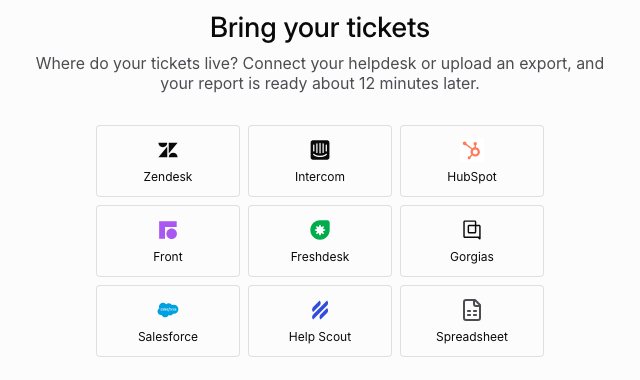
What each helpdesk gives your report
Exports leave different things out, so they fill different parts of the report.
Repeat contacts needs a customer email on every ticket. Answers that worked needs your team’s replies.
Zendesk
Connect if you can. It reads whole conversations, so you get the fullest report without exporting anything.Connect Zendesk
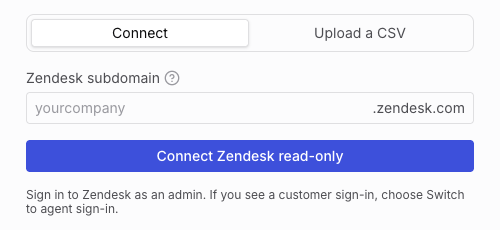
You need a Zendesk admin to approve access.- Select Zendesk, keep Connect selected, and enter your subdomain: the
yourcompanyinyourcompany.zendesk.com. - Select Connect Zendesk read-only.
- Sign in to Zendesk as an admin and approve. If you see a customer sign-in page, choose Switch to agent sign-in.
- Wait while Lorikeet reads your tickets. You can leave the page.
- Select Build my report.
- Read-only. Lorikeet asks for
tickets:readandusers:read, and can’t change anything in Zendesk. - Last 90 days, up to 5,000 tickets, most recently updated first. Internal notes are left out.
- Access is removed when the import ends, whether it finished or failed.
Upload a CSV instead
If you can’t connect, select Upload a CSV.- In Zendesk, go to Views and open a view of your recent tickets.
- Click Export CSV. Zendesk emails you the file.
Troubleshooting
We couldn't find yourcompany.zendesk.com
We couldn't find yourcompany.zendesk.com
Enter only the part before
.zendesk.com. If your company uses its own domain for Zendesk, ask your Zendesk admin for the zendesk.com subdomain.My company signs in to Zendesk with SSO
My company signs in to Zendesk with SSO
Sign in to Zendesk through SSO in the same browser first, then select Connect Zendesk read-only.
The sign-in expired, or the import stopped
The sign-in expired, or the import stopped
Select Connect Zendesk read-only again. Lorikeet has already disconnected.
Other helpdesks
Export a file, then upload it on Bring your tickets.Intercom
Intercom
- In Reports, open Dataset export and pick Conversations.
- Set the dates, then click Export CSV.
HubSpot
HubSpot
- Export your tickets as a CSV.
- HubSpot emails you the file.
Front
Front
- In Analytics, open the ⋯ menu and choose Export data.
- Pick Messages and download the file.
Freshdesk
Freshdesk
- Go to Tickets, then All tickets, then Export.
- Tick Description and set the date to Any time.
Gorgias
Gorgias
- In Analytics, open a report and click a metric.
- Choose Export, then Export with message content.
- Gorgias emails you the file.
Salesforce
Salesforce
- In Reports, create a report on Cases and Emails.
- Export it as Details Only, in CSV.
Help Scout
Help Scout
- Export your reporting data as a CSV.
- Help Scout emails you the file.
Spreadsheet
Use a spreadsheet when your helpdesk isn’t listed, or its export leaves out too much. Put one row per message.Download the template
tickets.csv, with four example tickets- Rows with the same ticket ID become one conversation.
Customermarks the customer’s messages. Anything else counts as your team.- Dates without a time zone are read as UTC. Rows with no date or author are skipped.
- Extra columns, such as plan or region, let Coach split findings.
File rules
- CSV up to 10 MB, or Excel (
.xlsx) up to 2 MB - Up to 5,000 tickets. Above that, Coach reads a sample of 5,000 that keeps each customer’s tickets together.