If you’re one of our subscribers that started on Lorikeet with workflows, moving to concierges probably comes with a lot of questions. While we’ve started collecting answers to the most frequently asked ones in our Concierge 2 FAQ, we know a lot of you are wondering about the thing that matters most: how this will affect the support conversations we hold with your customers. We built concierges to tackle the areas where our workflows struggled the most. To explain why, let’s take a look at a few sample tickets from everybody’s favourite made-up company, Acme.

Workflows

Let’s suppose that Acme is an online e-commerce company selling homeware goods to customers across Australia. Most of their support questions cluster around one of three requests: Where is my order, How do I change my delivery address, and What is my refund status. When Acme started on Lorikeet, their team built three workflows to handle each of the three requests, plus an FAQ workflow to answer remaining questions from their knowledge base. When a new message landed in Acme’s support desk, Lorikeet’s first job was to figure out which workflow should handle the task. We called this topic matching, and it had two steps: First, topic detection would read the incoming message and summarise what the customer was asking about. Then, workflow matching would try and choose the most applicable workflow by comparing this summary with each of their descriptions. If nothing matched, the conversation would typically fall back to a catch-all FAQ workflow to handle everything else. This works well when a customer’s request is clearly stated in their first message:
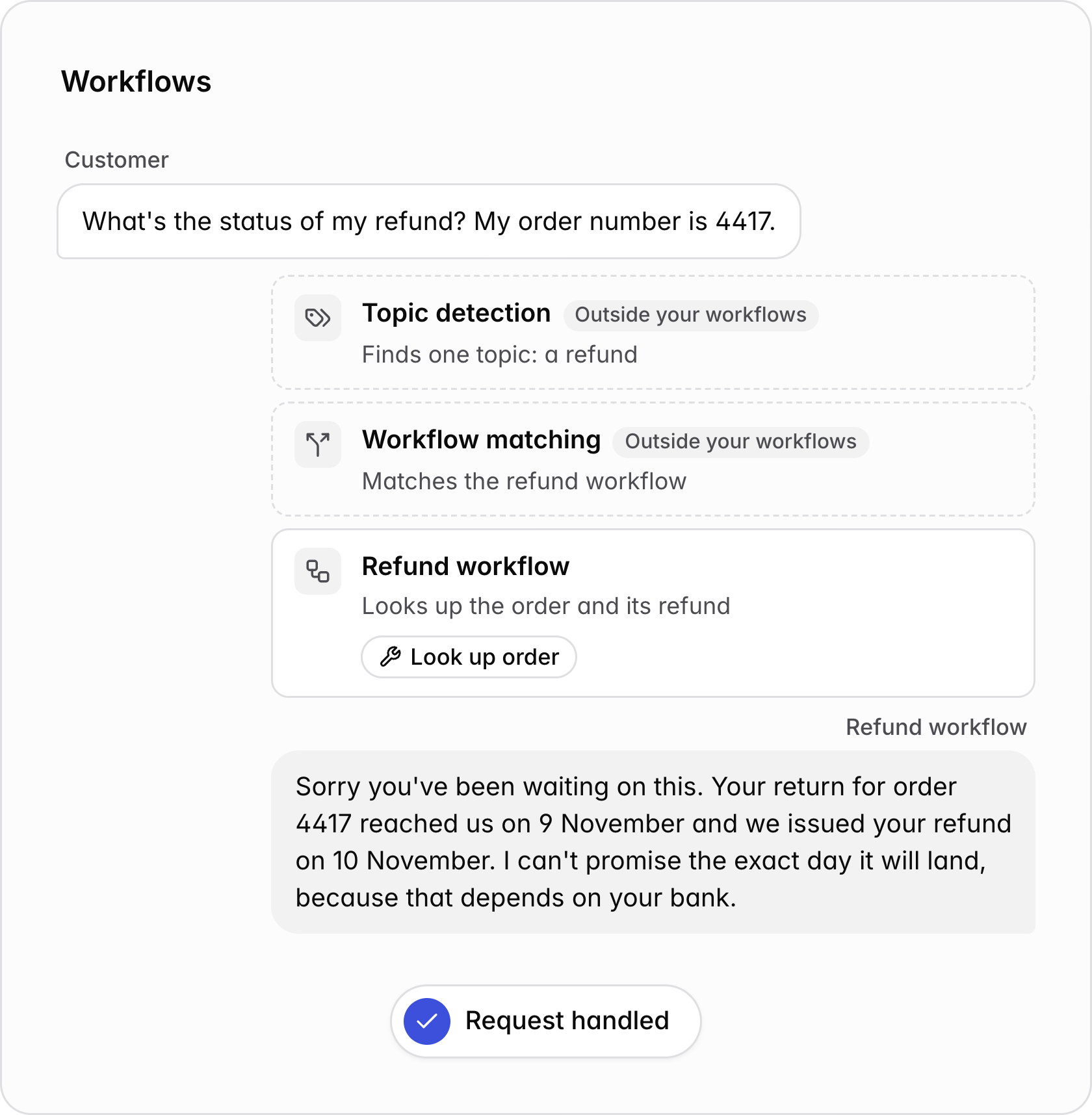
A clear request on workflows. The customer asks for the status of their refund and gives order 4417. Topic detection finds a refund, workflow matching picks the refund workflow, and the refund workflow looks up the order and replies. The request is handled.A clear request on workflows. The customer asks for the status of their refund and gives order 4417. Topic detection finds a refund, workflow matching picks the refund workflow, and the refund workflow looks up the order and replies. The request is handled.
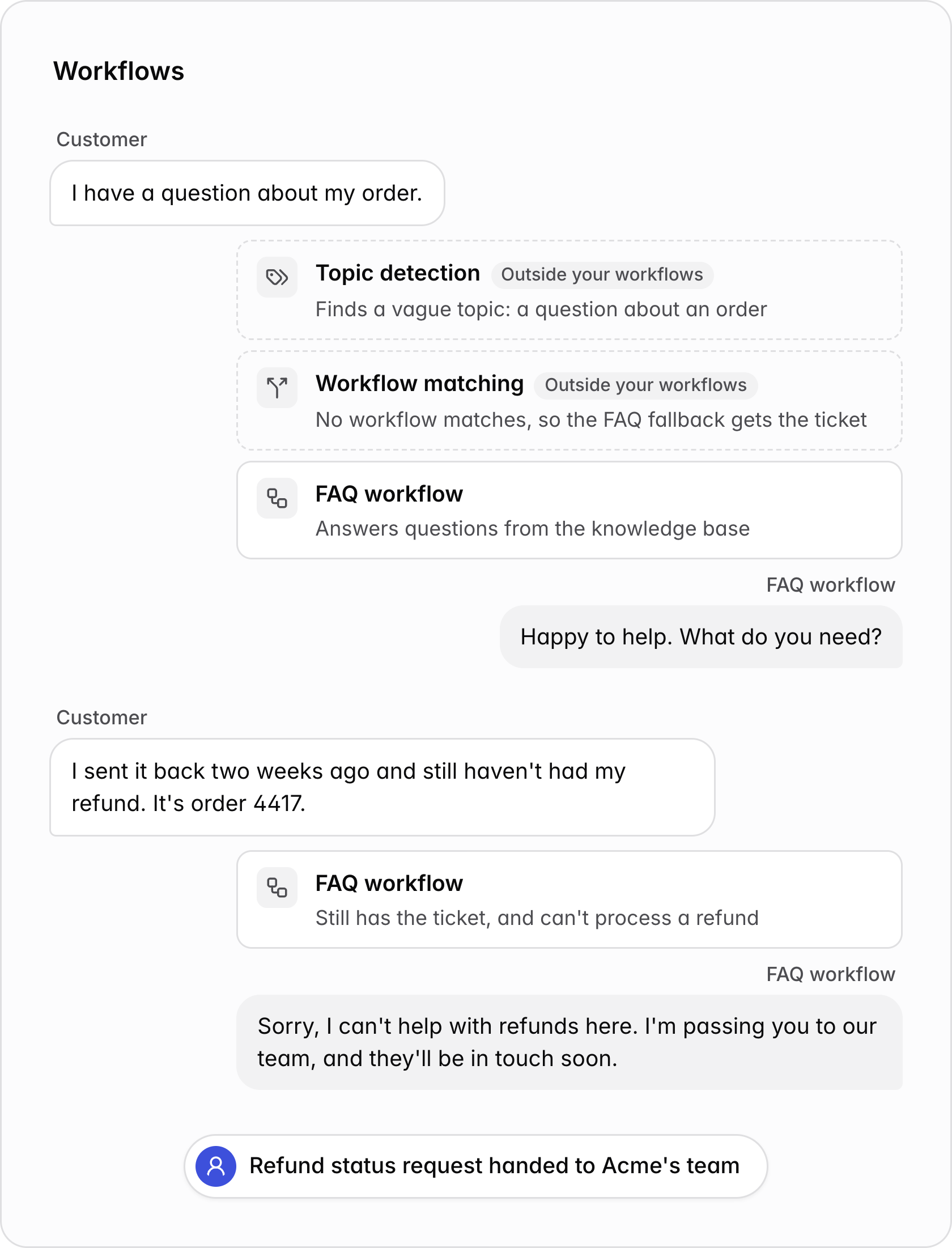
However, plenty of conversations don’t start like that. We frequently see customers opening a conversation with something vague, before clarifying their request a few turns in. In these cases, we were missing the information needed to choose the most applicable workflow from the first message. For many customers, this meant that they landed in the fallback FAQ workflow after the first turn. By the time they got around to their actual request, Lorikeet often struggled to realise the customer’s intent had changed. This meant that we weren’t able to give ourselves the right tools and instructions to handle the customer’s request.
A vague opener on workflows. Topic detection finds a vague topic, no workflow matches, and the FAQ workflow asks what the customer needs. When the customer asks about their refund, the FAQ workflow still has the ticket, can't process a refund, and hands the request to Acme's team.A vague opener on workflows. Topic detection finds a vague topic, no workflow matches, and the FAQ workflow asks what the customer needs. When the customer asks about their refund, the FAQ workflow still has the ticket, can't process a refund, and hands the request to Acme's team.
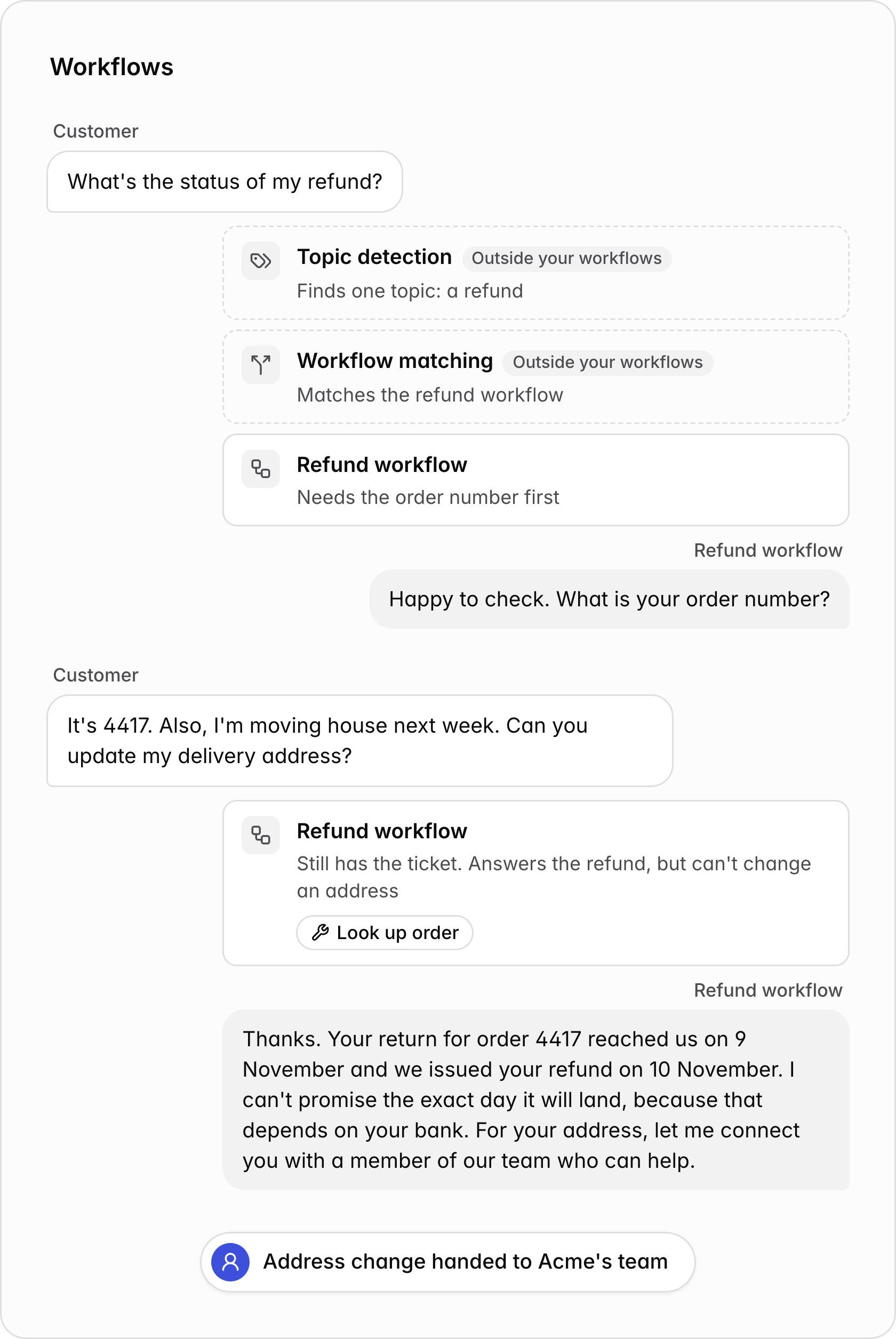
Since there could only be one workflow active at a time, tickets containing more than one topic were challenging as well. If a customer’s message contained two or more requests, Lorikeet could only start the workflow that matched best, and the other request often ended up with your team. An example here is when a customer is partway through one workflow, and decides to ask about something else while they’re in the conversation:
A change of topic on workflows. The customer asks about their refund, topic matching picks the refund workflow, and it asks for the order number. The customer gives it and asks to update their delivery address. The refund workflow still has the ticket, answers the refund, and hands the address change to Acme's team.A change of topic on workflows. The customer asks about their refund, topic matching picks the refund workflow, and it asks for the order number. The customer gives it and asks to update their delivery address. The refund workflow still has the ticket, answers the refund, and hands the address change to Acme's team.

Concierges

What if Acme moved their support over to a concierge? During migration, their three workflows became skills: one for refunds, one for address changes and one for order tracking. Instructions that were common to each workflow found their new home inside the concierge prompt. This included their style guidelines, how Acme support greeted customers, when to hand off to their team, access to their knowledge base, and other rules about their business and what not to say. With concierges, there is no topic matching that runs at the start of every conversation. Instead, the concierge takes on the ticket directly, works out what the customer needs, and loads the skills it needs to help. Once a skill is loaded, it stays loaded for the rest of the ticket, and the concierge can keep bringing in more as the conversation moves. So what happens to our two difficult tickets? Here’s a customer who opens with something vague, and then asking about a refund and an address change in the same message:
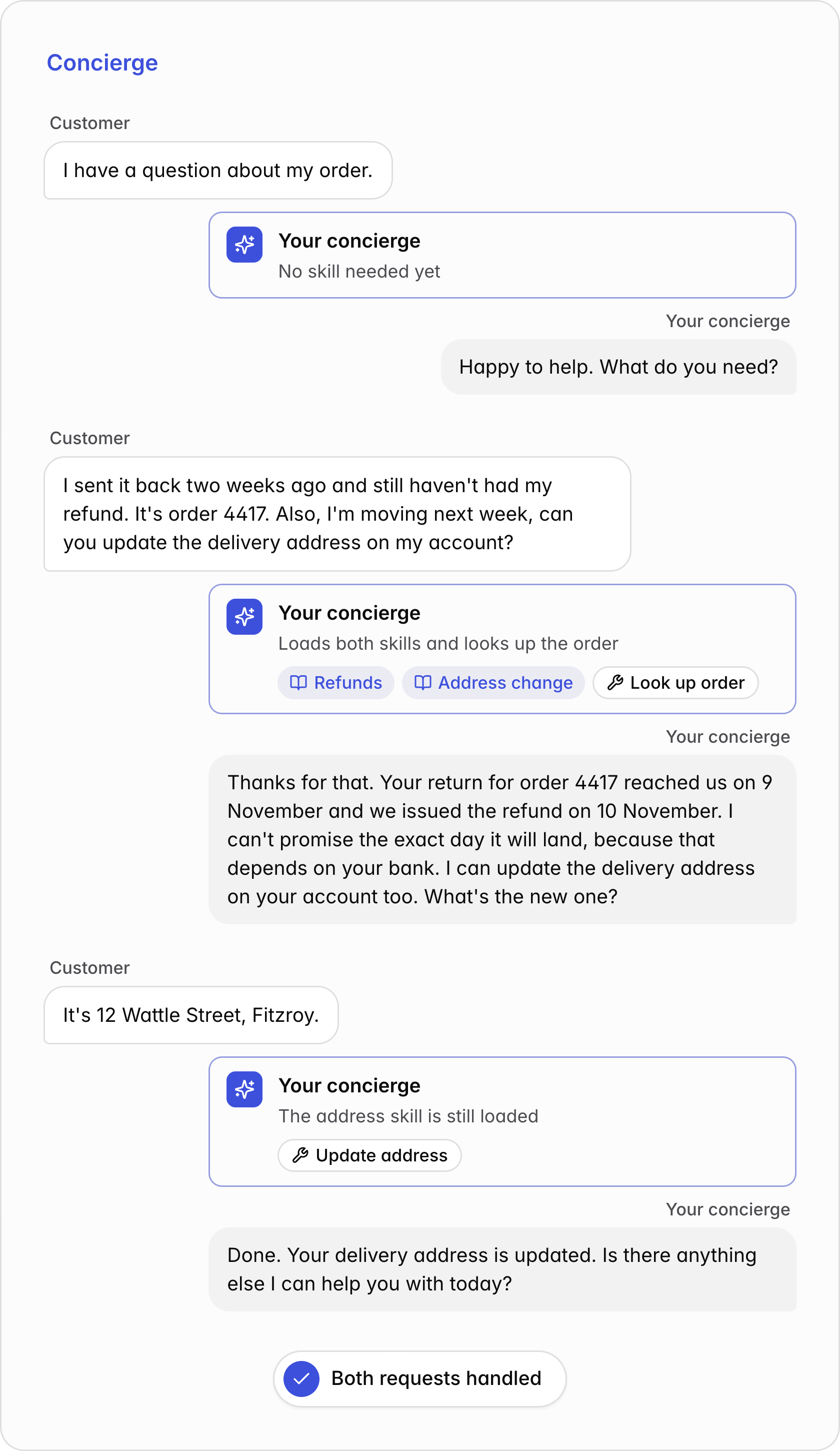
The same conversation on a concierge. It asks what the customer needs with no skill loaded, then loads the refunds and address change skills, looks up the order and answers both requests. When the customer sends their new address, the address skill is still loaded, so it updates it.The same conversation on a concierge. It asks what the customer needs with no skill loaded, then loads the refunds and address change skills, looks up the order and answers both requests. When the customer sends their new address, the address skill is still loaded, so it updates it.

Comparing them side-by-side

Here’s how a single message moves through the two agent architectures:
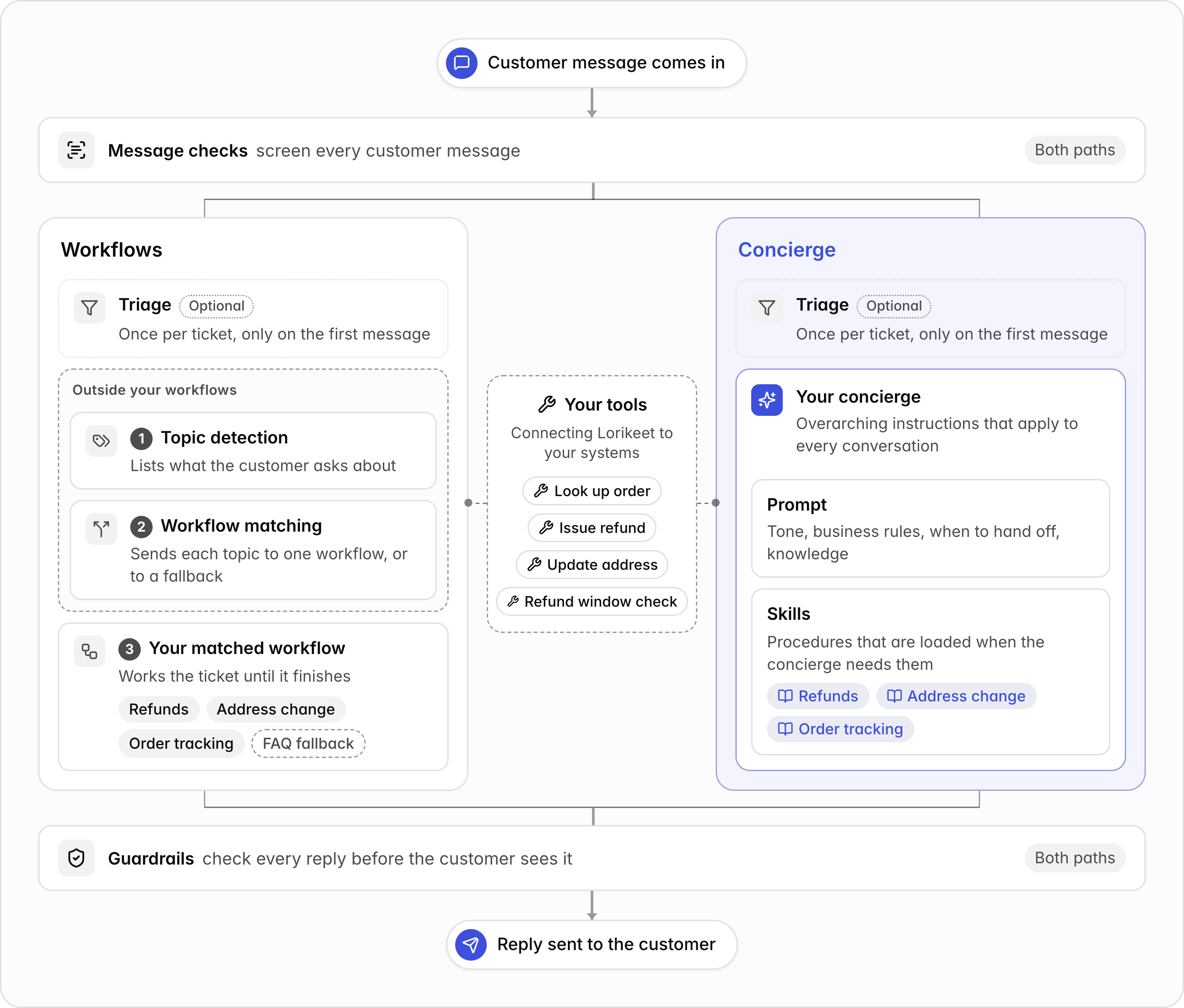
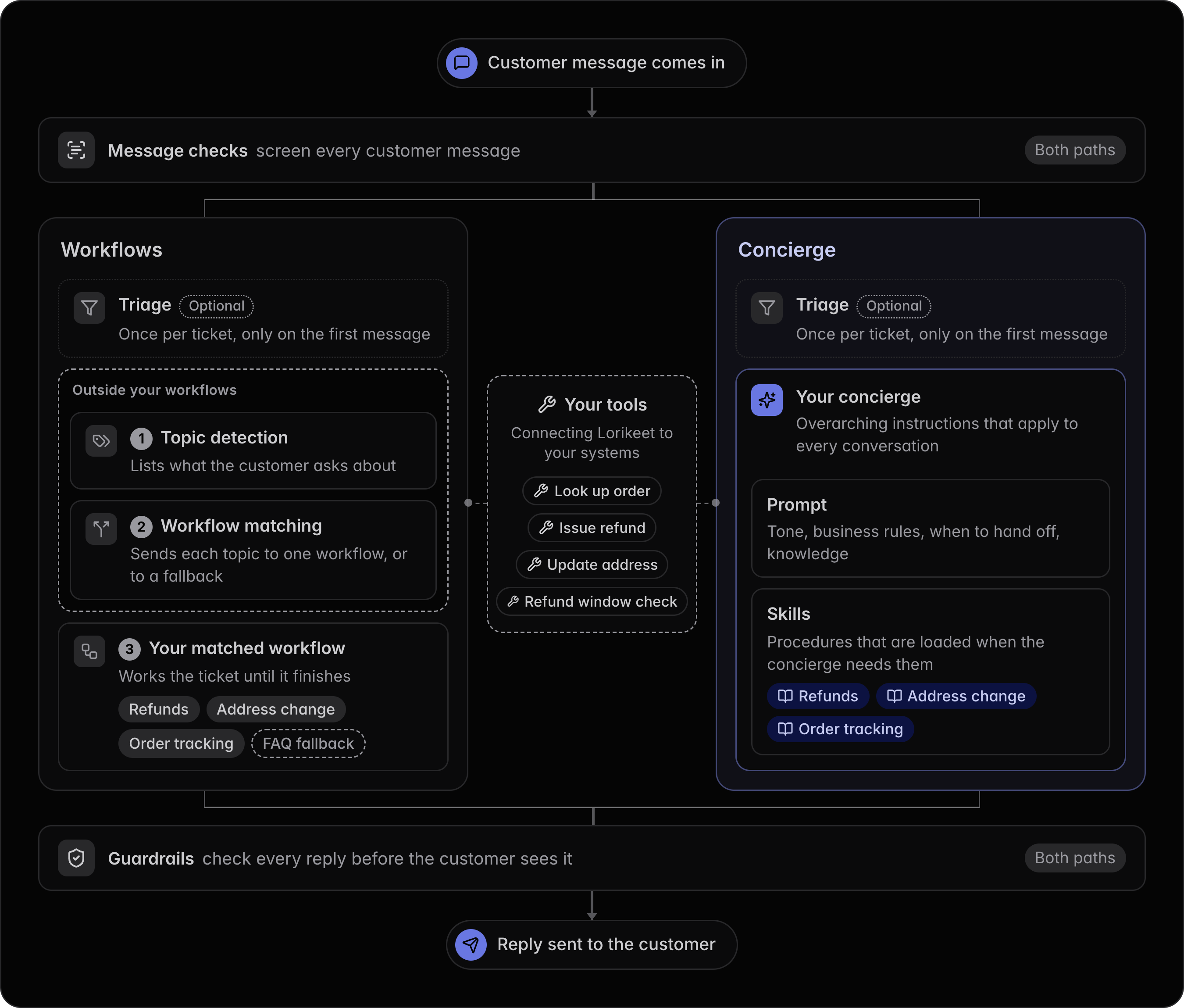
The path a message takes. Message checks screen every customer message on both paths. On workflows, optional triage runs once per ticket, then topic detection and workflow matching run outside your workflows, then your matched workflow works the ticket until it finishes. On a concierge, optional triage runs once per ticket, then your concierge, with its prompt and skills, handles the message. Both paths call the same tools, such as look up order, issue refund and update address. Guardrails check every reply before it is sent.The path a message takes. Message checks screen every customer message on both paths. On workflows, optional triage runs once per ticket, then topic detection and workflow matching run outside your workflows, then your matched workflow works the ticket until it finishes. On a concierge, optional triage runs once per ticket, then your concierge, with its prompt and skills, handles the message. Both paths call the same tools, such as look up order, issue refund and update address. Guardrails check every reply before it is sent.
The difference lives in the two sections across the middle. Everything around it stays the same:
  • Tools are the actions Lorikeet takes in your systems: look up an order, issue a refund, update an address. Both concierges and skills can reference the same tools that your workflows did, so everything you’ve built comes with you. Mention a tool in the skill that uses it, or in the concierge’s prompt if any conversation might benefit from it.
  • Message checks screen every customer message before Lorikeet replies. Keep them for the few things that must be caught on the way in, such as messages with regulatory or compliance implications.
  • Triage workflows are structured workflows that run once per ticket, on the first message, before Lorikeet replies. Keep them for fixed checks that must route a ticket up front, such as handing off every message from a flagged account.
  • Guardrails check every reply before your customer sees it. A guardrail can steer the concierge to rewrite its intended reply, escalate a ticket to your team, or raise an alert.
Message checks and guardrails now attach to concierges directly instead of a brand.

What goes where?

With concierges, you can configure overarching instructions that apply to every conversation. This provides a natural home for global rules that your conversations need to follow. However, message checks and guardrails are also a place where you can implement these global rules. How should you decide what goes where? Let’s suppose that, before migrating over to concierges, Acme had a total of five message checks and guardrails:
  • Guardrail: Never promise a specific date that a customer’s refund will arrive by.
  • Guardrail: Never use em-dashes or emojis in your reply.
  • Message check: Questions about bulk orders are sent to our sales team.
  • Message check: Escalate the conversation if a customer threatens legal action
  • Message check: Escalate the conversation if the customer asks for a human
For each one, Acme asked two questions. Is this a rule the concierge could simply be told? And if it is, could Acme live with the concierge occasionally getting it wrong? Three of the five were a yes on both, so they moved into the concierge. Avoiding em-dashes and emojis is part of how Acme writes, so it can be added to concierge’s rules around tone and voice instead. Sending bulk order questions to sales and handing off when a customer asks for a human can be added to the concierge’s rules on how to escalate a conversation. There’s a benefit here too: since the concierge sits with the conversation, it can hand-off with context, such as making informed decisions about which support team is most relevant for a customer’s issue. The other two stayed where they were. Acme can’t afford to miss a legal threat, so that one should stay as a message check. And while the refund date rule should be added to the concierge as a global business rule, Acme might want to keep the guardrail as a final backstop against false promises. Similar heuristics are helpful to figure out where other things go. If an instruction applies to every conversation, it goes in the concierge prompt. If it’s the steps for a specific kind of task, it goes into that task’s skill. And if it’s something that involves a deterministic calculation, such as checking whether an order is still inside the 30-day refund window, or working out a refund after shipping costs, it should go into a code tool. For more guidance on where to make your changes, check out the page.

During and after your move

Each ticket runs on workflows or on Concierge 2, never a mix of both.
  • During the rollout, Lorikeet moves a growing share of new tickets to Concierge 2. A ticket stays on whichever one it started on.
  • After your move, every new ticket goes to your concierge.
Tickets that were open before your move finish on your workflows, including when a customer reopens a closed ticket. Your old response and fallback workflows will remain visible on our platform under a Legacy classification.
  • : where each part of your setup went
  • Concierge 2 FAQ
  • : where each kind of rule goes
  • : how a concierge resolves or hands off a conversation